
AI Services
Put AI to work on confidential data without handing that data over. We build AI tools that keep sensitive information on your side.
Confy AI: private AI for Excel
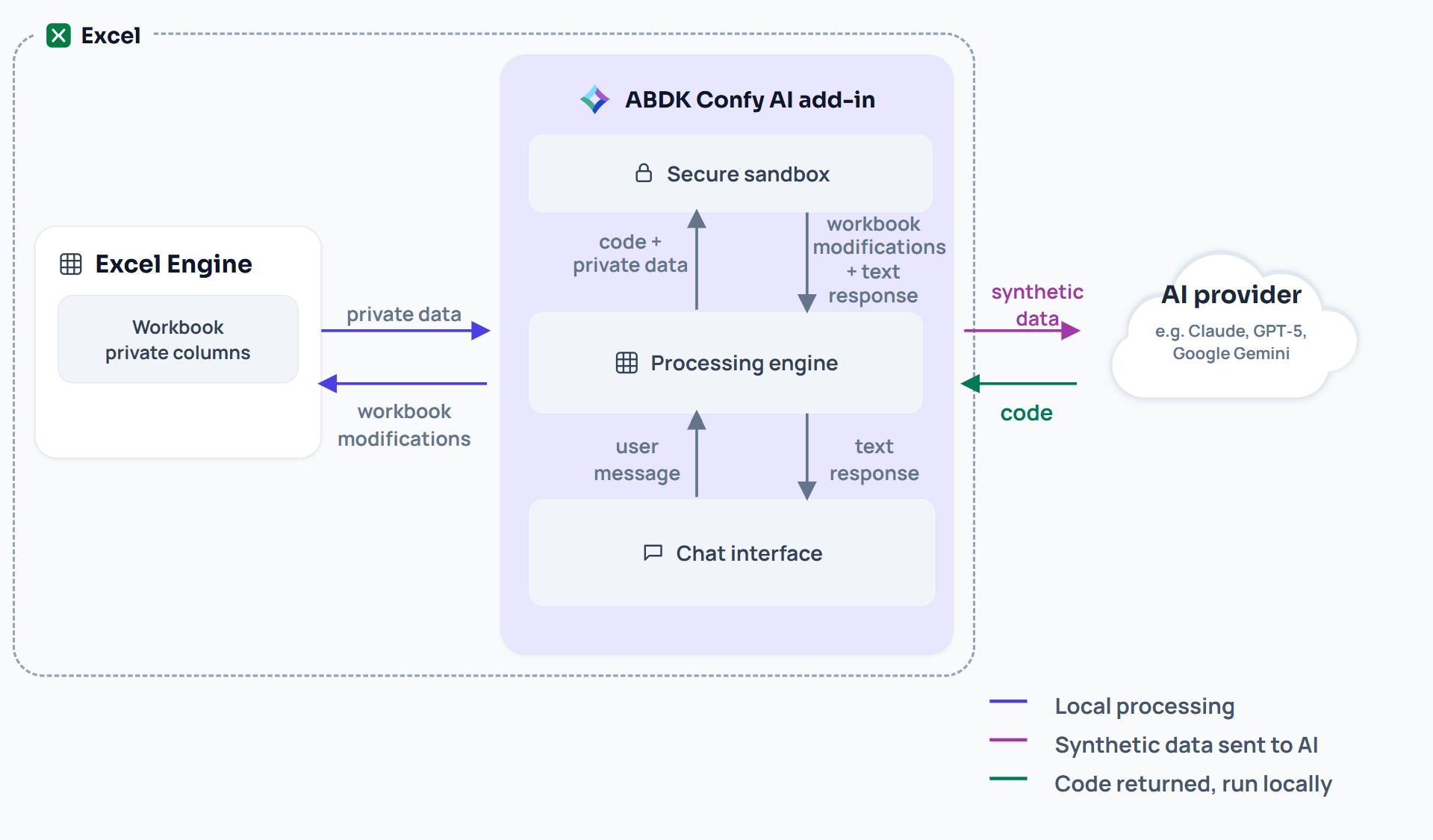
Ask an AI to analyze or edit a spreadsheet while the values in the columns you mark private never reach it. The AI works on synthetic stand-ins and writes code; that code then runs on your real values, inside your browser. Free to install, with your own AI provider account.
Get Confy AI from Microsoft MarketplaceOr install it right in Excel, on the web or desktop: Home › Add-ins › More Add-ins, search “Confy AI”.
How your data flows
You choose
what stays private
PRIVATEMark any column as private: names, salaries, IBANs, medical notes, wallet addresses. The marks are stored in the workbook and move with the columns when you insert, delete or rearrange them.
Synthetic
stand-ins
SYNTHETICBefore anything is sent, every private cell is replaced with a realistic value of the same type and range. The AI sees data that behaves like yours but belongs to no one.
Exact answers,
computed locally
LOCALThe AI writes code against the synthetic copy. Confy then runs that code on your real values in your browser, so the answer is exact and the model never sees it.
Sealed sandbox
SANDBOXAI-written code runs in an isolated sandbox with all network access blocked. Confy checks that block every time it starts and refuses to run at all if the check fails.
Your provider,
your key
BYOKWorks with OpenAI, Anthropic, Google Gemini, OpenRouter or any OpenAI-compatible endpoint, including a model you host yourself. Requests go straight from your browser to that provider, with no ABDK server in between.
Changes written
into Excel
EDITAsk for a new column, a cleanup, a summary or a chart, and Confy writes it straight into your workbook, formulas included. Any column it adds waits for you to decide whether it is private.
WHY CHOOSE ABDK
FOR PRIVATE AI


Privacy claim tested end to end: we plant canary values in a workbook and scan every outgoing request for them

No account and no ABDK server: your data goes only to the AI provider you choose

Published limits: we state exactly what reaches the AI and what never does

Beyond the add-in
The idea behind Confy AI works anywhere a model has to act on data it must not see. We can bring it to your own systems.
Discuss your projectPrivate AI for
your systems
CONSULTINGWe apply the same approach to your databases, internal tools and data pipelines. The model sees the schema and synthetic rows; its code runs on your real data, inside your infrastructure.
Enterprise rollout
ENTERPRISERoll Confy AI out across your Microsoft 365 organisation, connect it to a model endpoint you control, and train the teams who handle client data.
How to request
AI Services?
1
Describe your data and workflow
2
Get a proposal and timeline
3
Pay a deposit
We will make it fast and furious, just like in a movie
Request AI Services